
How to Read Deleted Messages On GBWhatsApp
GBWhatsApp, as a popular third-party communication application, offers more personalized and privacy control options compared to the WhatsApp. One feature that has attracted a lot of attention from users is the ability to view deleted messages. Whether it’s the chat records being accidentally deleted or the friends voluntarily withdrawing their messages, many users hope to be able to view these information.
Understanding how GBWhatsApp reads deleted messages helps users make better use of the app and avoid missing important conversations.
GBWhatsApp Deleted Messages Feature Overview
GBWhatsApp includes several features designed to control message visibility inside chats. One of the most popular functions is the anti-delete message feature, which prevents messages from disappearing after they are removed by the sender.
Key characteristics of this feature include:
- Deleted messages may remain visible in the conversation
- Chat history stays more complete without sudden gaps
- The app may show a notification when someone deletes a message
- Deleted content can still be reviewed later
This feature helps users maintain full context in conversations.
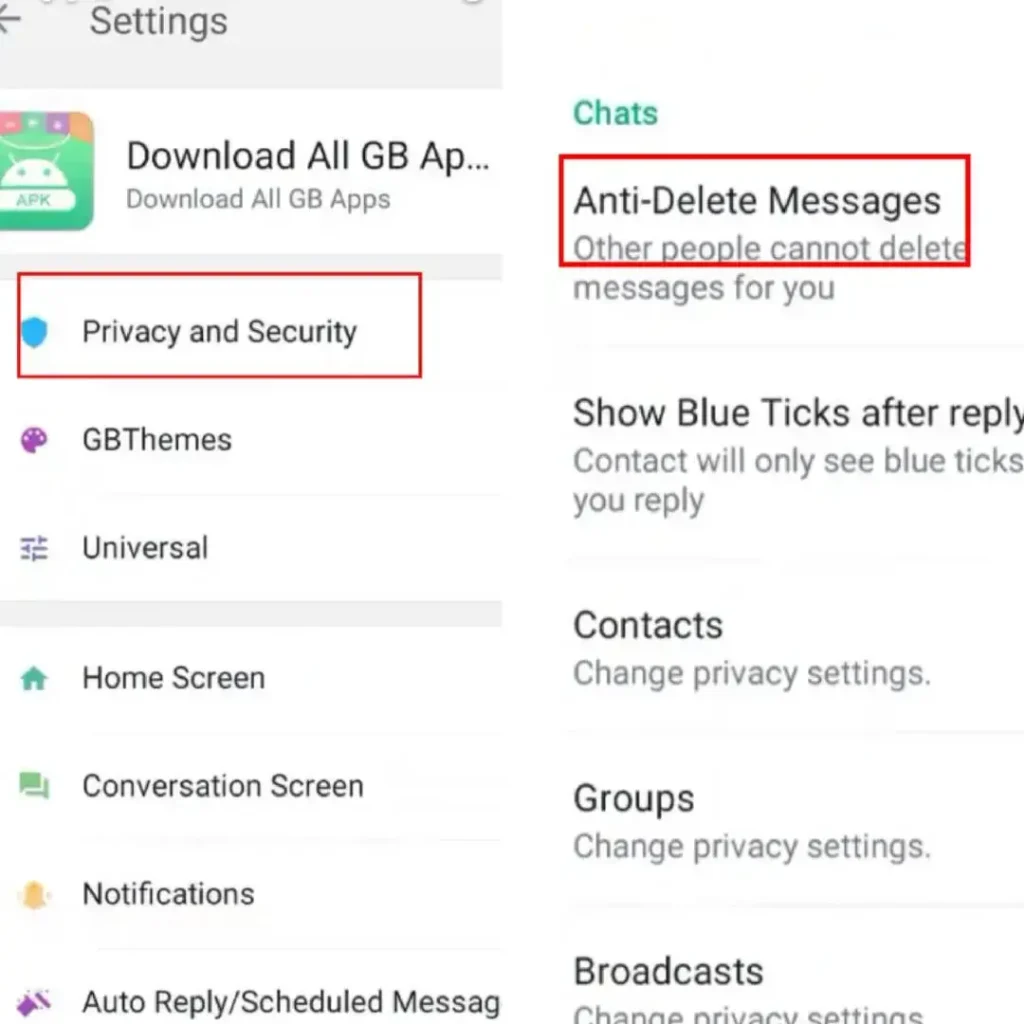
How to Read Deleted Messages on GBWhatsApp
Reading deleted messages is possible using built-in features and device tools. Methods include:
- Enable Anti-Delete Messages – Turn on this option in GBWhatsApp settings to automatically keep deleted messages visible.
- Check Notification Log – Android notification history may contain message previews. Messages deleted afterward can sometimes be viewed here.
- Restore Chat Backups – Local or cloud backups may include messages deleted after the backup. Restoring the backup can recover text and media.
Combining these features ensures messages remain readable, even after deletion attempts by the sender.
Chat Backup and Recovery Options in GBWhatsApp
Backups play an important role in preserving deleted messages. GBWhatsApp stores local backups and may allow cloud backups for text and media.
Backup considerations:
- Local backups store chat history on the device.
- Cloud backups provide additional protection.
- Restoring older backups may recover deleted messages.
- Regular backups reduce the risk of losing conversations or media.
Maintaining frequent backups ensures deleted messages and media can be retrieved if needed.
GBWhatsApp Notification Log for Deleted Messages
Android devices maintain notification logs, which can sometimes reveal deleted messages. When a message arrives, a preview is saved by the system, even if the message is later deleted in chat.
Key details:
- Notification previews temporarily store message content.
- Deleted messages may be accessible through notification history.
- Functionality depends on device version and settings.
This method provides an additional way to recover deleted messages when anti-delete features are not enabled.
GBWhatsApp Privacy Considerations for Deleted Messages
Reading deleted messages raises privacy concerns. The delete message option was created to allow users to control their chat content.
Important points:
- Some messages are deleted to correct mistakes or remove sensitive information.
- Anti-delete features override the sender’s intention.
- Responsible use of GBWhatsApp helps maintain respectful communication.
- Awareness of privacy rules ensures ethical usage of deleted message reading functions.
Balancing convenience with respect to privacy is essential when using modified messaging apps.
GBWhatsApp Updates and Feature Stability
GBWhatsApp is regularly updated to improve performance, stability, and anti-delete features. Updates can change how deleted messages are handled.
Key update considerations:
- New versions may improve anti-delete functionality.
- Updates fix bugs and improve chat visibility.
- Compatibility with the latest WhatsApp system is essential.
- Using outdated versions may reduce the effectiveness of deleted message recovery.
Regular updates ensure features work as intended and maintain compatibility with the messaging environment.
Conclusion
GBWhatsApp provides several methods to read deleted messages, including anti-delete messages, notification logs, and chat backups. These features allow conversations to remain complete and prevent important content from being lost. While these functions are helpful, users must consider privacy and security risks. Regular updates, responsible usage, and maintaining backups help ensure deleted messages are recoverable while keeping chats secure.